Input psi?

Discussion in '94-95 5.0 Tuning' started by tjh566, Mar 26, 2007.

  1. tjh566 New Member

    Member Since:
    May 22, 2004
    Message Count:
    615
    Likes Received:
    0
    Trophy Points:
    0
    I see on calcon where it can log psi... how do I get it to log that?

    I know I probly need a sending unit.. but where can i get one of those, i searched a little, found one on jegs but its $70 and I dont know how i would input it into the ECU. Im looking for a cheap alternative to that and how its entered into tweecer.
  2. final5-0 New Member

    Member Since:
    Apr 7, 2003
    Message Count:
    6,803
    Likes Received:
    0
    Trophy Points:
    0
    This is just a guess on my part OK :D

    Seems like you could get a dataQ interface that would provide several
    input channels to the Tweecer.

    I guess you could then output the psi interface to the data Q :shrug:

    Grady
  3. BobCat New Member

    Member Since:
    Feb 13, 2001
    Message Count:
    21
    Likes Received:
    0
    Trophy Points:
    0
    You basically have 2 options. IF you are no longer using the emissions equip then you can purchase a 2 or 3 bar GM MAP sensor and log by using the EVP input the instructions will be exactly the same as this except you will hookup the 3 wires to sthe Map sensor instead. http://home.austin.rr.com/dwoodall/wbo2_install.htm

    OR

    If you are still running all of your emissions equipment then you can purchase the DATAQ logger and then run it like this with the only change being that DATAQ now offers a USB ver. to replace the Serial connection.
    [IMG]
  4. vristang Advanced Member

    Member Since:
    Mar 31, 2005
    Message Count:
    4,692
    Likes Received:
    0
    Trophy Points:
    66
    Sweat diagram BobCat! :nice:
    I may be using that as a starting point for my O2's & DATAQ :)

    Since you guys did such a great job on that response... :hail2:
    Let me piggy back on this topic a little...

    Is it possible to datalog engine vac in the same way?
    I would guess I could use a standard Ford MAP sensor?

    Muchas Gracias,
    jason
  5. tjh566 New Member

    Member Since:
    May 22, 2004
    Message Count:
    615
    Likes Received:
    0
    Trophy Points:
    0
    ok this GM MAP sensor, which one do I need, ive seen a few and do you have a link to where i can get one?
  6. vristang Advanced Member

    Member Since:
    Mar 31, 2005
    Message Count:
    4,692
    Likes Received:
    0
    Trophy Points:
    66
    I have a part number that I scribbled on a sticky note several months ago...
    15305891
    Not sure if that is a GM p/n or what? I found that on the forums, so double check before buying...

    jason
  7. BobCat New Member

    Member Since:
    Feb 13, 2001
    Message Count:
    21
    Likes Received:
    0
    Trophy Points:
    0
    1-bar for measuring vacuum

    GM part # 2503679
    standard part # AS-5

    2-bar Map sensor good for 15psi

    GM part # 16009886
    Wells part # SU-129
    standard part # AS-4

    3-bar Map sensor good for 30psi

    GM part # 16040749
  8. tjh566 New Member

    Member Since:
    May 22, 2004
    Message Count:
    615
    Likes Received:
    0
    Trophy Points:
    0
    Thanks bobcat, you've been very helpful :nice:
  9. Stanger007 Founding Member

    Member Since:
    Sep 26, 2001
    Message Count:
    2,029
    Likes Received:
    0
    Trophy Points:
    0
    I'm coming a bit late to the party - here's some info below that Mike Glover (guy that writes twEECer software) gave me on the 3bar MAP sensor setup he uses on his personal car.

    I'll be sending data to the twEECer using the 2nd channel my DataQ (instead of EGR plug) exactly as the diagram above shows, pulling 5v etc from the EGR.

    Wes

    ---
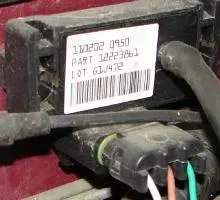
    I have attached an image (wont come through to the group, just you Wes). The part number on the sensor is:

    11/02/02 0950
    Part 12223861
    Lot 61J472

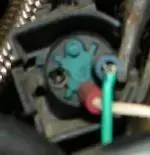
    Use the EGR sensor voltage to power the 3bar sensor. I attached a pic of my connection. This info is in the next manual update.

    Attached Files:

Share This Page