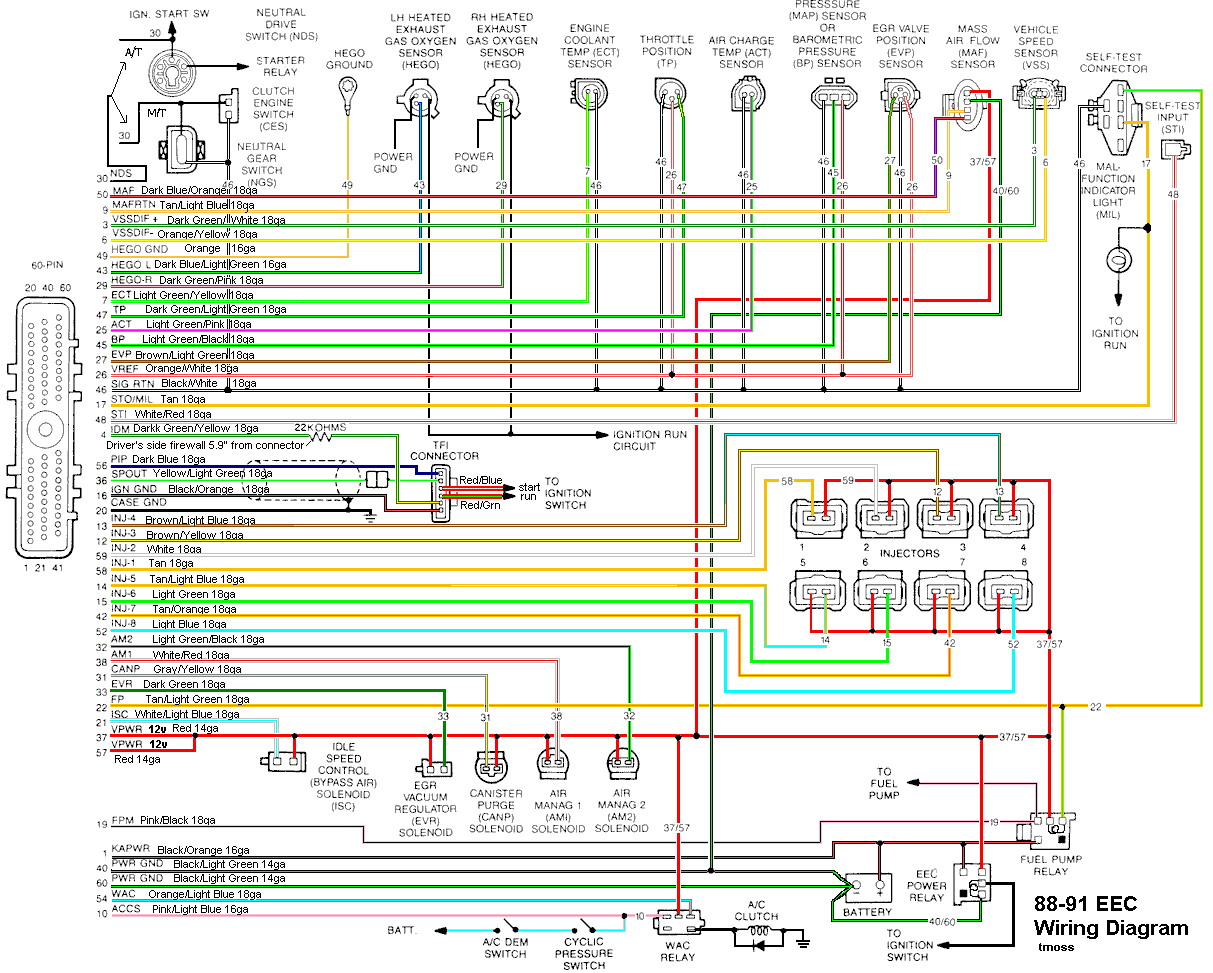
Code 51 Engine Coolant Temperature (ECT) sensor signal is/was too high -
Possible bad ECT sensor, or wiring. Possible missing signal ground –
black/wire wire broken or bad connection. With the power off, measure the
resistance between the black/white wire and battery ground. You should see
less than 1 ohm. Check the same black /white wire on the TPS and MAP
sensor. More than 1 ohm there and the wire is probably broken in the harness
between the engine and the computer. The 10 pin connectors pass the
black/white wire back to the computer, and can cause problems.
Pin 7 on the computer - ECT signal in. at 176 degrees F it should be .80 volts
Voltages may be measured across the ECT by probing the connector from the rear.
Use care in doing it so that you don't damage the wiring or connector.
Here's the table :
68 degrees F = 3.02 v
86 degrees F = 2.62 v
104 degrees F = 2.16 v
122 degrees F = 1.72 v
140 degrees F = 1.35 v
158 degrees F = 1.04 v
176 degrees F = .80 v
194 degrees F = .61
Note that all resistance tests must be done with power off. Measuring resistance
with a circuit powered on will give false readings and possibly damage the meter.
Ohms measures at the computer with the computer disconnected, or at the sensor with
the sensor disconnected.
50 degrees F = 58.75 K ohms
68 degrees F = 37.30 K ohms
86 degrees F = 27.27 K ohms
104 degrees F = 16.15 K ohms
122 degrees F = 10.97 K ohms
140 degrees F = 7.60 K ohms
158 degrees F = 5.37 K ohms
176 degrees F = 3.84 K ohms
194 degrees F = 2.80 K ohms
Diagram courtesy of Tmoss & Stang&2birds
See the following website for some help from Tmoss (diagram designer) & Stang&2Birds (website host) for help on 88-95 wiring
http://www.veryuseful.com/mustang/tech/engine/
http://www.veryuseful.com/mustang/tech/engine/images/IgnitionSwitchWiring.gif
http://www.veryuseful.com/mustang/tech/engine/images/fuel-alt-links-ign-ac.gif
http://www.veryuseful.com/mustang/tech/engine/images/88-91_5.0_EEC_Wiring_Diagram.gif
Code 66 MAF below minimum test voltage.
Insufficient or no voltage from MAF. Dirty MAF element, bad MAF, bad MAF wiring,
missing power to MAF. Check for missing +12 volts on this circuit. Check the two
links for a wiring diagram to help you find the red wire for computer power relay
switched +12 volts. Check for 12 volts between the red and black wires on the MAF
heater (usually pins A & B). while the connector is plugged into the MAF. This may
require the use of a couple of safety pins to probe the MAF connector from the back
side of it.
There are three parts in a MAF: the heater, the sensor element and the amplifier.
The heater heats the MAF sensor element causing the resistance to increase. The
amplifier buffers the MAF output signal and has a resistor that is laser trimmed to
provide an output range compatible with the computer's load tables.
The MAF element is secured by 2 screws & has 1 wiring connector. To clean the
element, remove it from the MAF housing and spray it down with electronic parts
cleaner or non-inflammable brake parts cleaner (same stuff in a bigger can and
cheaper too).
The MAF output varies with RPM which causes the airflow to increase or decease.
The increase of air across the MAF sensor element causes it to cool, allowing more
voltage to pass and telling the computer to increase the fuel flow. A decrease in
airflow causes the MAF sensor element to get warmer, decreasing the voltage and
reducing the fuel flow. Measure the MAF output at pins C & D on the MAF
connector (dark blue/orange and tan/light blue) or at pins 50 & 9 on the computer.
At idle = approximately .6 volt
20 MPH = approximately 1.10 volt
40 MPH = approximately 1.70 volt
60 MPH = approximately 2.10 volt
Check the resistance of the MAF signal wiring. Pin D on the MAF and pin 50 on the
computer (dark blue/orange wire) should be less than 2 ohms. Pin C on the MAF
and pin 9 on the computer (tan/light blue wire) should be less than 2 ohms.
There should be a minimum of 10K ohms between either pin C or D on the MAF
and ground.
See the following website for some help from Tmoss (diagram designer) & Stang&2 Birds (website host)
http://www.veryuseful.com/mustang/tech/engine/images/fuel-alt-links-ign-ac.gif
http://www.veryuseful.com/mustang/tech/engine/images/88-91eecPinout.gif
Code 85 - CANP solenoid - The Carbon Canister solenoid is inoperative. Check
vacuum lines for leaks and cracks. Check electrical wiring for loose connections,
damaged wiring and insulation. Check solenoid valve operation by grounding the
gray/yellow wire to the solenoid and blowing through it.
The computer provides the ground for the solenoid. The red wire to the solenoid is
always energized any time the ignition switch is in the run position.
Code 95 - the 95 code is because at one time or another the fuel pump relay
hiccupped and didn't provide power the pump when the computer told it to run.
Sometimes this is a one time thing, other times it is a no run or runs poorly
condition.
To help troubleshoot the 95 code, follow this link for a wiring diagram
http://www.autozone.com/images/cds/gif/large/0900823d80167162.gif
Using the diagram, check the red/black wire from the fuel pump relay: you should
see 12 volts or so. If not, check the inertia switch: on a hatch it is on the drivers
side by the taillight. Look for a black rubber plug that pops out: if you don't find it,
then loosen up the plastic trim. Check for voltage on both sides of the switch. If
there is voltage on both sides, then check the Pink/black wire on the fuel pump
relay: it is the power feed to the fuel pump. No voltage there, check the Orange/lt
blue wire, it is the power feed to the fuel pump relay & has a fuse link in it.
Good voltage there & at the Pink/black wire, swap the relay.
Code 98 - basic computer internal tests not passed before it started processing the
request to dump codes. Do a Key On Engine Off test before starting the engine.
Wait until you see the 11 flash before pressing any buttons if you have a hand
operated scanner. The computer is operating in Limp mode, so fix any codes it
dumps prior to doing anything else.